
PhotoScape Specifications
- 📅
Updated Date
08/22/2024
- 🆚
Version
V3.7
- 💻
Operating System
Windows XP, Vista, 7, 8, 10, 11
- 🌐
Language
Korean, English, Japanese, Chinese, etc.
- 🛠️
Memory
Minimum 512MB RAM (Recommended 2GB or more)
- 💾
Storage Space
Minimum 100MB free space
- ⬇️
Download File
PhotoScapeSetup_V3-7.exe (20.1MB)
- 🔑
License
Free
A Simple Image Editing Program for Bloggers
PhotoScape is a free-to-use image editing software that offers a wide range of features from simple edits to applying advanced filters and effects. Its intuitive interface and diverse tools make it suitable for everyone, from beginners to professionals.
Main Features
Intuitive Interface
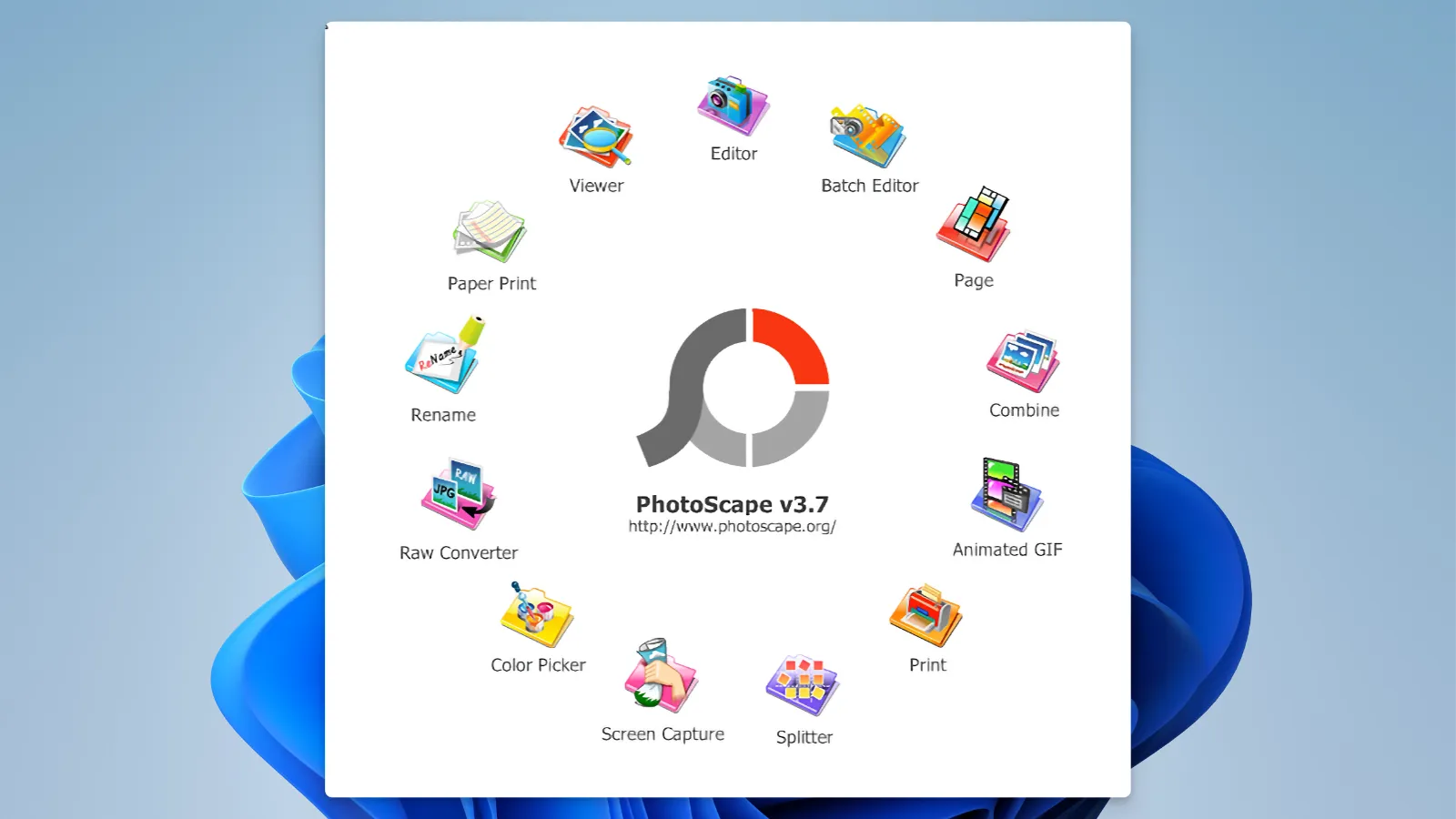
PhotoScape offers an intuitive user interface that is easily accessible to everyone. The main features are clearly arranged, allowing even first-time users to complete basic edits with just a few clicks. This ease of use is a major advantage over advanced editing software like Adobe Photoshop. Unlike other programs with overwhelming advanced features and complex UIs, PhotoScape prioritizes convenience and usability.
Simple Editing Tools
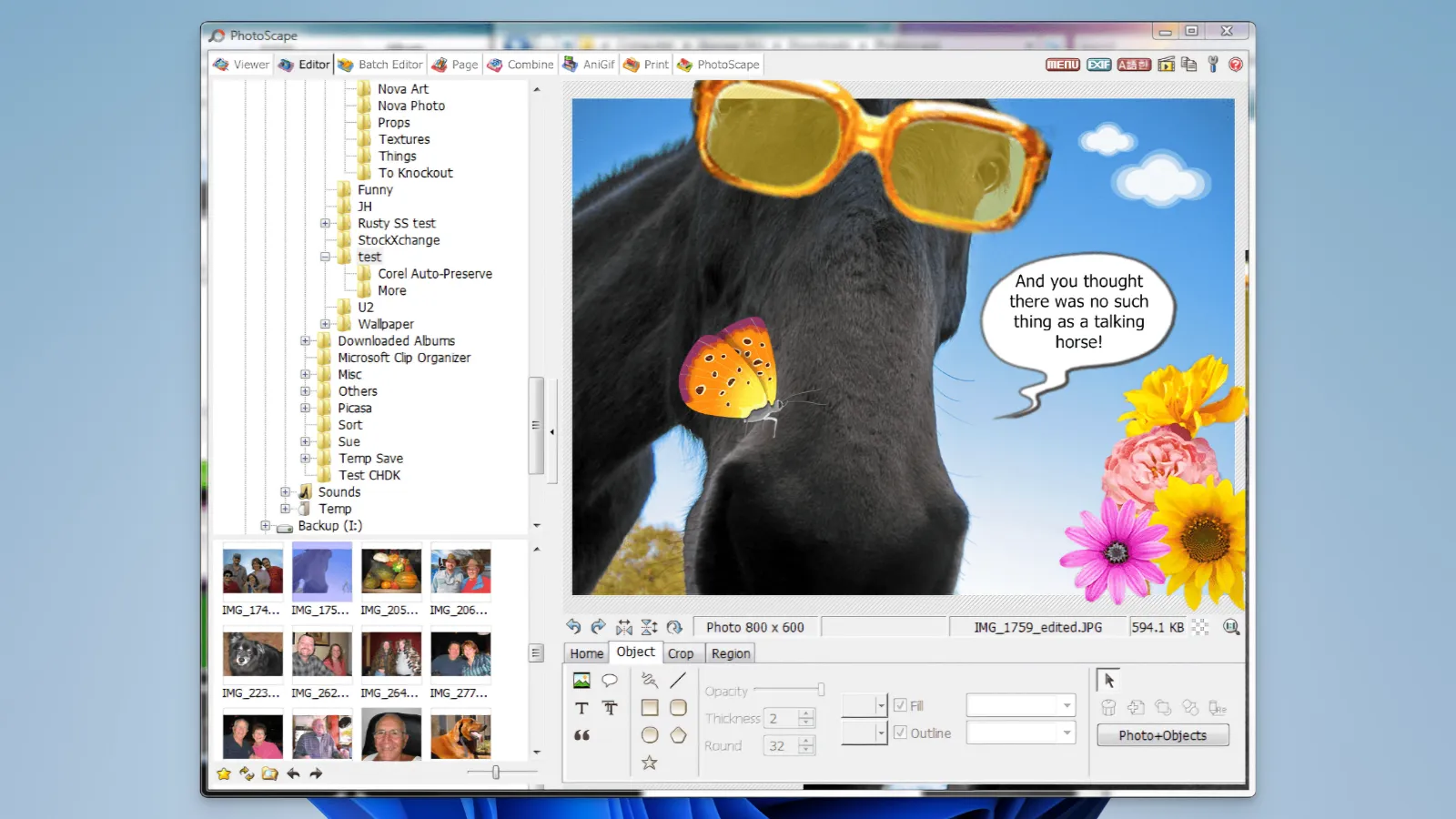
PhotoScape includes basic editing tools like brightness, contrast, and color adjustments, as well as resizing, cropping, and rotating functions. The batch editing feature is particularly useful as it allows you to edit multiple photos at once, maximizing time efficiency. This function is similar to Lightroom’s batch processing feature but stands out for being available for free.
Various Filters and Effects
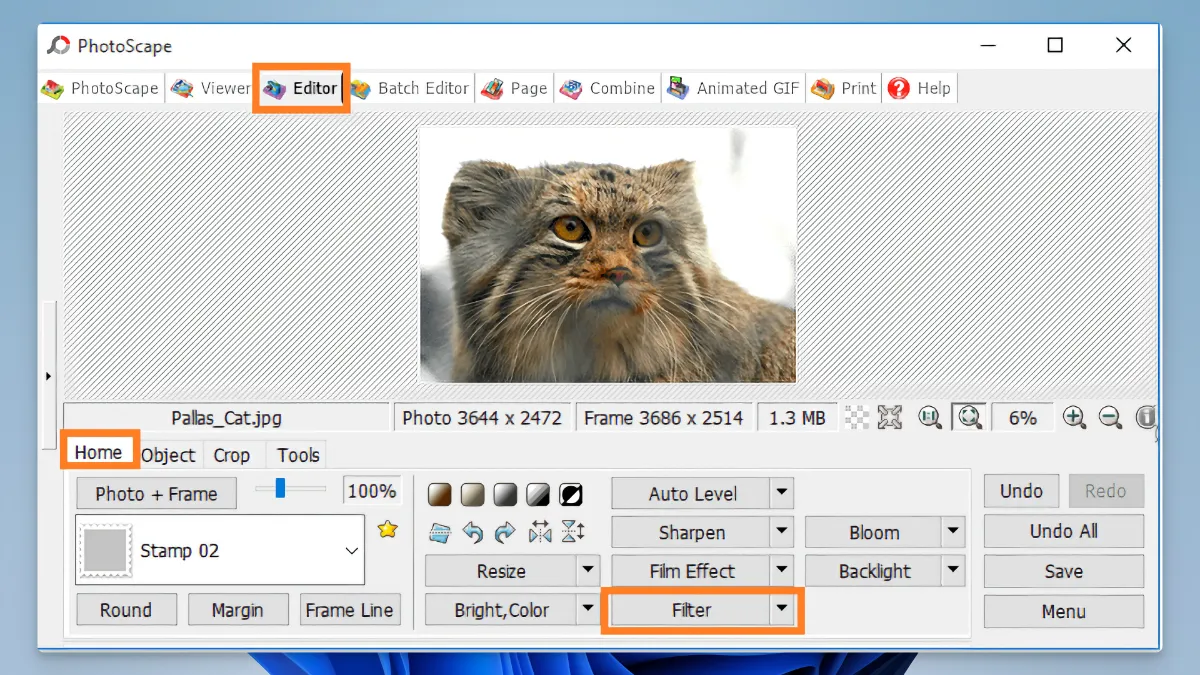
PhotoScape provides tools for applying various filters and effects to your photos. Examples include retro effects, black-and-white conversion, and mosaic effects, which can be easily implemented with just a few clicks, unlike the complex settings required in Photoshop or GIMP. It also supports non-destructive editing, allowing you to revert to the original image anytime after applying filters.
GIF Animation Creation
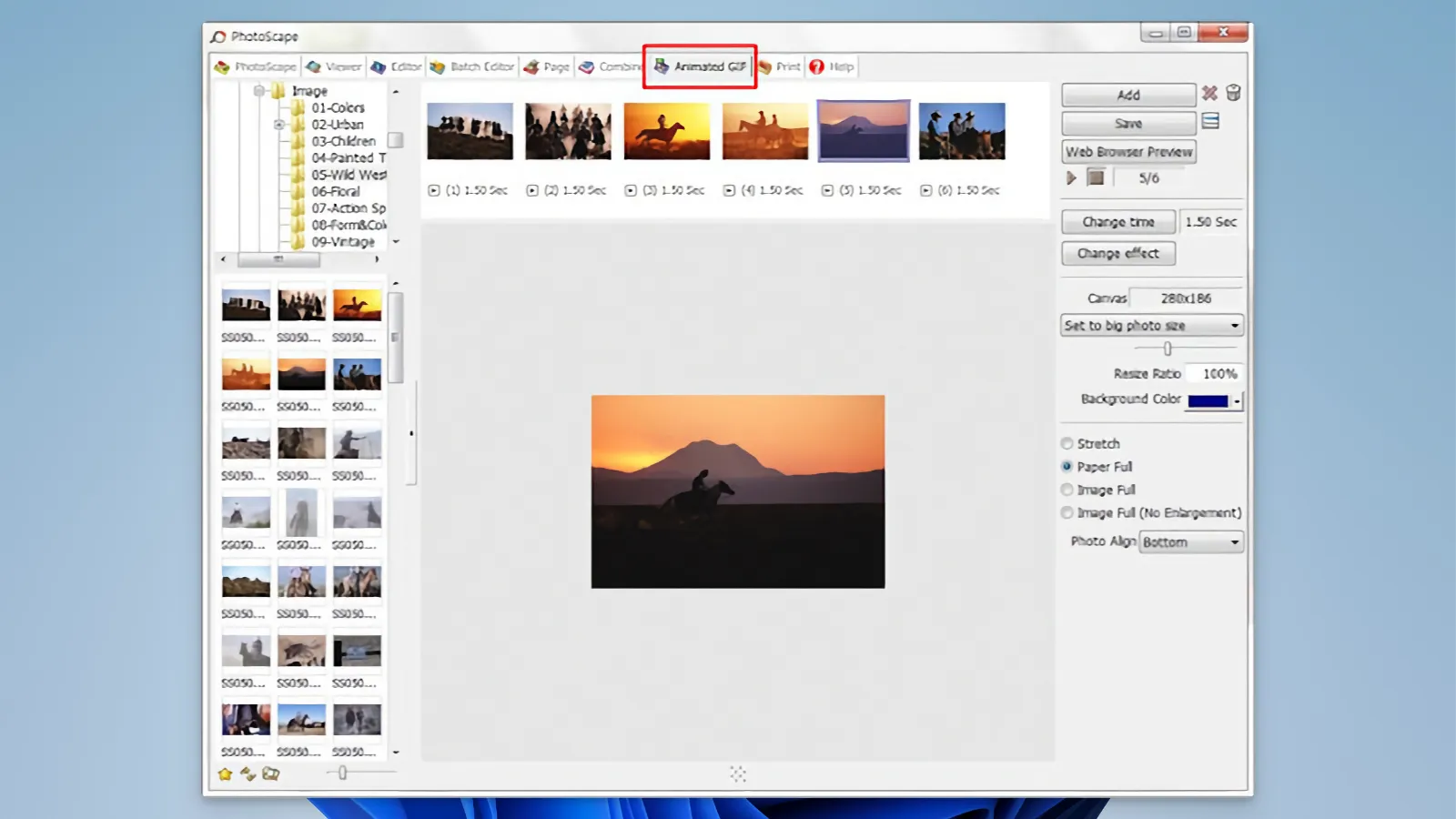
PhotoScape offers an easy-to-use feature for creating GIF animations. You can stitch together multiple images to create a GIF and easily adjust the speed and transition effects of each frame. This feature is a major strength, offering functionalities typically found in expensive software from Adobe for free.
Image Viewer
PhotoScape’s image viewer allows you to organize and view photos by folder. It also includes a simple slideshow feature, making it useful for viewing and appreciating photos. This feature not only allows you to view images but also provides basic editing capabilities, making it convenient to manage and edit images in one place.
Color Picker
PhotoScape also offers a color picker tool that allows you to extract specific colors from images. This tool is especially useful for web designers or graphic designers, as it allows you to instantly check color code values, increasing work efficiency. While this tool is usually offered in professional software like Photoshop, PhotoScape provides it for free.
Comparison with Alternative Image Editing Programs
| Feature | PhotoScape | PIXLR | Canva | Fotor | BeFunky | GIMP |
|---|---|---|---|---|---|---|
| Basic Image Editing | O | O | O | O | O | O |
| Layer Editing | X | O | X | X | X | O |
| Filters and Effects | O | O | O | O | O | O |
| GIF Animation Creation | O | X | X | X | X | X |
| Batch Editing | O | X | X | O | X | X |
| Color Picker | O | X | X | X | X | O |
| Non-Destructive Editing | X | O | X | X | X | O |
| Text Addition and Editing | O | O | O | O | O | O |
| Free Usage | O | O | O | O | O | O |
PhotoScape is a software that excels in basic image editing and GIF animation creation, making it especially suitable for beginners and users who need to perform simple tasks. Compared to similar applications, PhotoScape features an intuitive interface and allows users to quickly and easily perform tasks using basic editing tools.
While it lacks advanced features like layer editing and non-destructive editing, which can be seen as drawbacks compared to Adobe Photoshop or GIMP, for users who do not require such functions, the simplicity of PhotoScape becomes a significant advantage. Moreover, since PhotoScape is available for free, the ability to use powerful features without financial burden is a major benefit.
Ultimately, for users who prioritize simple editing tasks and ease of use, PhotoScape might be the most suitable choice. The ability to easily perform batch editing and GIF creation is a standout feature of PhotoScape.
Resource Usage
| Application | CPU Usage (%) | Memory Usage (MB) | Disk Space (GB) |
|---|---|---|---|
| PhotoScape | 5% | 150MB | 0.2GB |
| PIXLR | 10% | 300MB | Online-based |
| Canva | 7% | 200MB | Online-based |
| Fotor | 8% | 250MB | 0.5GB |
| BeFunky | 6% | 180MB | Online-based |
| GIMP | 15% | 800MB | 2.0GB |
In terms of resource usage, PhotoScape is a lightweight program that can run smoothly even on low-spec computers. Its low CPU and memory usage make it very efficient for basic editing tasks, and it doesn’t require much disk space, making it suitable for older computers or environments with limited resources.
If you’re looking for lightweight software that can be used in resource-constrained environments, PhotoScape could be the best choice. It’s especially useful when you need a lightweight program that can run locally and offers sufficient performance for basic editing tasks.
User Reviews
User-Friendly with a Gentle Learning Curve
Users consistently praise PhotoScape for its ease of use. It is particularly rated as suitable software for beginners, allowing them to easily explore various editing tools, making it ideal for those new to photo editing. However, some users mention that while the interface is accessible, it may take time to master the software completely to achieve more complex edits. This balance of simplicity and depth makes it especially popular among hobbyists who edit photos.
Performance and Reliability
One of the most praised features of PhotoScape is its lightweight design. It runs smoothly on most systems and is an important advantage for users with low-performance hardware. However, some users report that the software occasionally freezes or lags when processing multiple large files, which can be inconvenient during extensive editing sessions.
Strengths and Limitations
PhotoScape’s feature set is frequently highlighted as a strength. The software includes a variety of tools, such as batch editing, GIF creation, and color correction, making it flexible for different projects. However, some users feel that it lacks in areas like layer management or advanced retouching when compared to Adobe Photoshop.
References
- Software Advice User Reviews: Software Advice – PhotoScape X vs Adobe Photoshop Elements (Software Advice).
- Knoji Review: Knoji – PhotoScape Review (Knoji).
Pros
- User-friendly interface
- Variety of editing tools
- Easy batch processing
- GIF animation creation possible
- File size optimization features
Cons
- Lack of advanced editing features
- Outdated UI design
- No support for Mac version
- No layer editing
- Contains ads
PhotoScape : Download

System Requirements
| Category | Minimum Requirements | Recommended Requirements |
|---|---|---|
| Operating System | Windows XP, Vista, 7, 8 | Windows 10, 11 |
| Processor | Intel Pentium 4 or AMD Athlon 64 | Intel Core i3 or higher |
| RAM | 512MB | 2GB or more |
| Graphics | Basic integrated graphics | DirectX 9.0c compatible graphics card |
| Storage Space | 100MB free space | 500MB free space |
| Display | 1024×768 resolution | 1280×1024 resolution or higher |


.svg)


